AI Quant Trading · 量化策略研究台
 VibeMySpace 精选@vibemyspace-curated
编辑介绍
个人量化实验、指标、回测与交易监控集中在同一工作台。
AI 用途:当前版本使用规则、技术指标和交易 API 进行策略研究与回测;没有内置 AI 推理。
使用方式:当前版本没有 LLM 或内置机器学习推理;README 只预留把外部 sklearn / XGBoost .predict() 接进策略接口的扩展点。
原帖正文
AI Quant Trading Platform
A personal, full stack algorithmic trading platform for Indian stocks/ETFs, built on Zerodha Kite Connect. It covers the whole loop: pull market data → backtest a strategy → paper/live trade it → watch it on a live dashboard.
Built as a modular Python project so every layer (data, backtesting, risk, execution, dashboard) can be understood, tested, and extended independently.
Data (Kite Connect) → Storage (SQLite/Postgres) → Backtest Engine → Strategy
                                                          ↓
                                      Risk Manager → Order Manager → Paper/Live Trading
                                                          ↓
                                              FastAPI + Dashboard (live view)
1. Features
- Data layer: wraps Zerodha's Kite Connect API for historical candles, live LTP/quotes, and order placement; local SQLite (or Postgres) storage for OHLCV, trades, positions, and equity history.
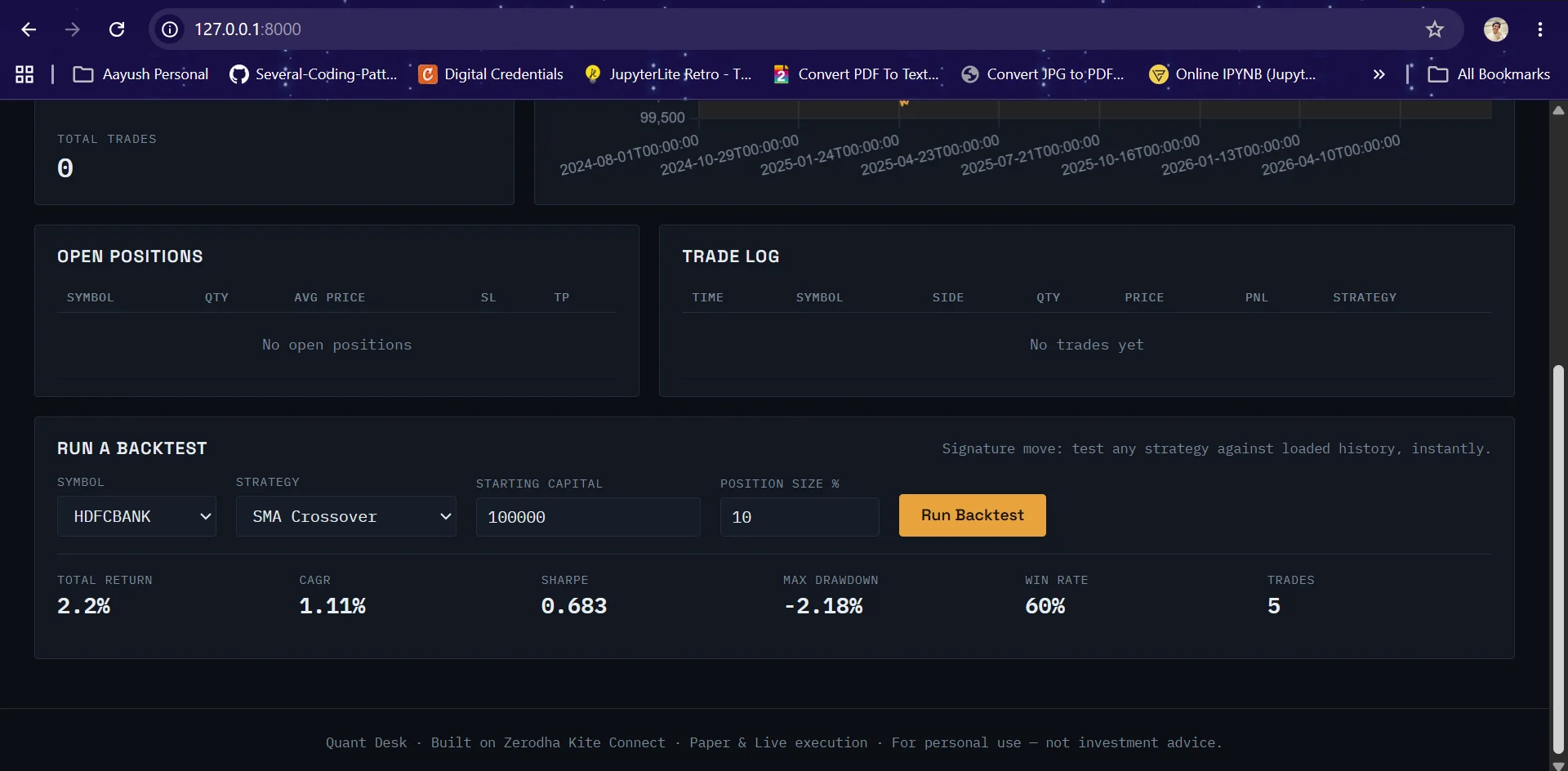
- Backtest engine: no lookahead bias, bar by bar simulation with commission + slippage, percent of equity position sizing, and a full metrics suite (CAGR, Sharpe, Sortino, max drawdown, win rate, profit factor).
- Strategies included: SMA Crossover, RSI Mean Reversion, Momentum plus a clean
BaseStrategyinterface so you can drop in your own (rule based or ML based) without touching the engine. - Risk management: position sizing caps, portfolio exposure caps, automatic stop loss / take profit computation and monitoring.
- Execution: one
OrderManagerinterface for both paper (simulated fills) and live (real Zerodha orders) trading same strategy code runs in both modes. - Dashboard: FastAPI backend + a dependency free HTML/CSS/JS frontend showing live equity curve, open positions, trade log, and an on demand backtest runner.
- Tests: 51 pytest tests covering the engine, strategies, risk manager, order manager, data store, and metrics — including an explicit no lookahead bias regression test.
- Works without a broker subscription:
scripts/generate_sample_data.pycreates realistic synthetic OHLCV data so you can backtest and demo the dashboard immediately, before paying for API access.
2. Project layout
quant-platform/
├── config/            settings.py (env-driven config), logging_config.py
├── data/               kite_client.py, data_store.py (SQLAlchemy models), historical_loader.py
├── backtest/           engine.py, metrics.py, strategies/ (base, sma_crossover, rsi, momentum)
├── execution/           risk_manager.py, order_manager.py, paper_trader.py (the live loop)
├── dashboard/           backend.py (FastAPI), static/ (index.html, style.css, app.js)
├── scripts/             generate_sample_data.py, load_historical_data.py, login.py,
│                        run_backtest.py, run_paper_trader.py
├── tests/                51 tests, run with `pytest`
├── main.py               single CLI entry point
├── requirements.txt
└── .env.example           copy to .env and fill in
3. Setup
3.1 Install dependencies
python3 -m venv venv
source venv/bin/activate        # Windows: venv\Scripts\activate
pip install -r requirements.txt
3.2 Try it immediately, no broker account needed
python main.py generate-sample-data --symbols RELIANCE,TCS,INFY,HDFCBANK --days 500
python main.py backtest --symbol RELIANCE --strategy sma_crossover
python main.py dashboard
# open http://localhost:8000
This gets you a working backtest engine and dashboard on realistic synthetic data. Use this to develop and test strategies before spending money on a broker API subscription.
3.3 Connect your real Zerodha account (for live data / paper / live trading)
- Get API access at developers.kite.trade — this is a paid subscription (~Rs. 2000/month at time of writing), separate from your regular Zerodha trading account.
- Create an app there, note the API key and API secret, and set a redirect URL
(e.g.
https://localhostfor personal use). - Copy
.env.exampleto.envand fill inKITE_API_KEYandKITE_API_SECRET. - Zerodha access tokens expire every day around 6am IST, so each trading day, run:
This opens a login URL, you authenticate in the browser, then paste back thepython main.py loginrequest_tokenfrom the redirect URL. The resulting access token is saved to.env. - Load real historical data:
python main.py load-data --symbols RELIANCE,TCS,INFY --days 500 - Now
main.py backtest,main.py dashboard, andmain.py tradewill all use real Zerodha data.
3.4 Paper trading (simulated orders, real live prices)
# .env: TRADING_MODE=paper (default)
python main.py trade --symbols RELIANCE,TCS --strategy sma_crossover --poll-seconds 60
This polls live LTPs during market hours (9:15–15:30 IST, Mon–Fri), feeds them + recent history into your strategy, risk-checks the signal, and simulates the fill — no real orders are placed. Everything is logged to the database and visible on the dashboard.
3.5 Live trading (real money, real orders)
# .env: TRADING_MODE=live
python main.py trade --symbols RELIANCE,TCS --strategy sma_crossover
Read this before you flip the switch:
- Backtest and paper-trade a strategy for a meaningful stretch of time first. A profitable backtest is a hypothesis, not a guarantee.
- The risk manager enforces
MAX_POSITION_PCTandMAX_PORTFOLIO_EXPOSURE_PCTfrom.env— review and tighten these before going live. - Start with capital you can afford to lose entirely. This is a personal project, not a regulated, audited trading system.
4. Running tests
pytest
51 tests covering: backtest engine correctness (including a dedicated test that proves signals don't use future data), all three strategies, risk manager edge cases, order manager paper-fill logic, data store persistence, and the metrics module.
5. Writing your own strategy
Every strategy implements one method:
from backtest.strategies.base import BaseStrategy
import pandas as pd

class MyStrategy(BaseStrategy):
    name = "my_strategy"

    def generate_signals(self, df: pd.DataFrame) -> pd.Series:
        # df has columns: open, high, low, close, volume, indexed by timestamp
        # return a Series of the same length/index with values:
        #   1  = go/stay long
        #   0  = go/stay flat
        #  -1  = go/stay short (only used if allow_short=True)
        ...
That's it the same class works in BacktestEngine, PaperTrader, and live trading,
because none of them care how the signal was produced (rules, indicators, or a trained
ML model — a scikit-learn/XGBoost .predict() call fits the same interface).
6. Design notes / why things are built this way
- No lookahead bias: the backtest engine computes a strategy's signal using data up
to bar t's close, then executes at bar t+1's open. This is enforced with a
.shift(1)and covered by a regression test (test_no_lookahead_bias) that verifies truncating the input data doesn't change earlier trades. - One OrderManager for paper and live: strategies and the trading loop never know
which mode they're in — only
OrderManagerandKiteClientbranch on it. This means code you validate in paper mode is exactly the code t
来源与作者
- 原作者:Aayush Pandey (@aayushpandey01)
- 发布平台:GitHub
- 原帖:查看原帖
- 权利说明:VibeMySpace 仅作带来源的整理展示,内容与图片权利归原作者。
开源信息
已开源。