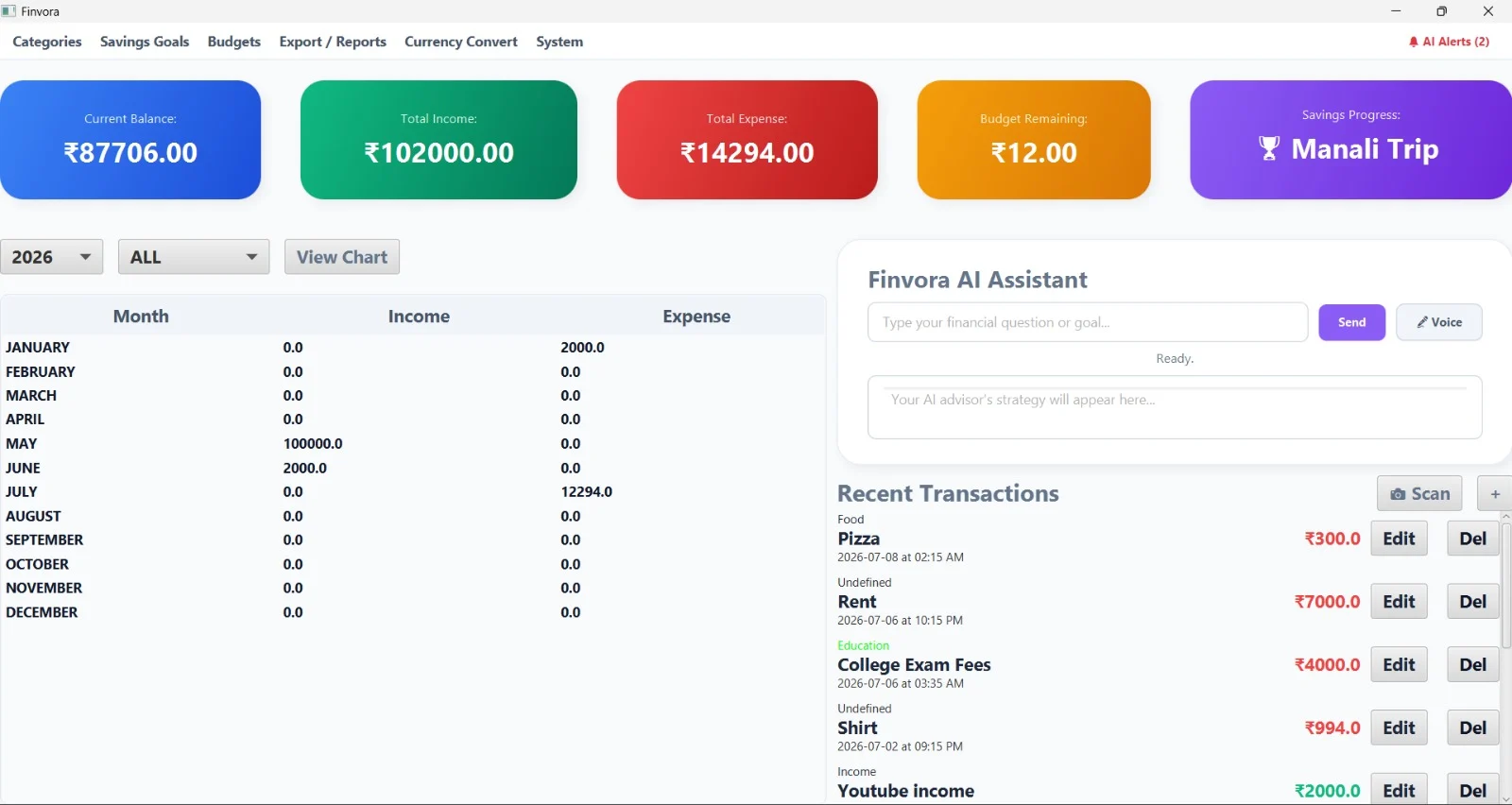
Finvora · 个人财务管理台
 VibeMySpace 精选@vibemyspace-curated
编辑介绍
预算、储蓄目标、报表、交易与 AI 顾问集中在桌面应用。
AI 用途:AI Assistant 根据个人交易和目标回答财务问题,并支持语音输入。
使用方式:直接调用 OpenAI、Mistral、Gemini API;Key 目前是源码占位符,需要用户编辑代码。
原帖正文
<a href="LICENSE"> </a> <a href="https://github.com/yuvanvishnupandi/Finance_Tracker_APP/stargazers"> </a> <a href="https://github.com/yuvanvishnupandi/Finance_Tracker_APP/network/members"> </a> <a href="https://github.com/yuvanvishnupandi/Finance_Tracker_APP/commits/main"> </a> <a href="https://www.oracle.com/java/"> </a> <a href="https://spring.io/projects/spring-boot"> </a> <a href="https://openjfx.io/"> </a> <a href="https://deepmind.google/technologies/gemini/"> </a> <a href="https://mistral.ai/"> </a><table> <tr> <td></td> <td></td> </tr> <tr> <td></td> <td></td> </tr> <tr> <td></td> <td></td> </tr> </table>
What you get
<details> <summary><b>See all features</b></summary> <table> <tr> <td width="50%" valign="top">💰 Core financial tracking
- Expense Tracking — monitor total expenses, view spending trends, and receive automated insights.
- Budget Management — track overall budget utilization and monitor category-specific limits.
- Savings Goals — track progress bars and percentage gauges for specific financial targets.
- Transaction History — chronological logs of transactions with precise dates and times.
- Data Export — single-click exporting of financial data into PDF format.
- Currency Converter — instantly convert between different currencies.
🧠 AI features
- Dedicated AI Assistant — a conversational AI window that knows your exact balance, transactions, and goals.
- Voice-Activated Chat — inline voice prompting with infinite Google TTS chunking. Just talk to your AI advisor!
- AI Receipt Scanner — upload receipts to automatically extract names, amounts, and dates with zero manual entry.
- Multi-LLM Engine — resilient routing powered by Gemini, Mistral, and OpenAI APIs.
- Predictive AI Alerts — get real-time pop-ups when your spending habits approach danger zones.
Get started
git clone https://github.com/yuvanvishnupandi/Finance_Tracker_APP.git
cd Finance_Tracker_APP
Compile and run the Spring Boot backend server and the JavaFX frontend client. Detailed instructions are in the Local Setup below.
🚀 Tech Stack
<table align="center"> <tr> <td align="center" width="180" height="180"> <a href="https://www.oracle.com/java/"><b>Java</b> </a>
</td> <td align="center" width="180" height="180"> <a href="https://spring.io/projects/spring-boot"><b>Spring Boot</b> </a>
</td> <td align="center" width="180" height="180"> <a href="https://openjfx.io/"><b>JavaFX</b> </a>
</td> <td align="center" width="180" height="180"> <a href="https://maven.apache.org/"><b>Maven</b> </a>
</td> </tr> <tr> <td align="center" width="180" height="180"> <a href="https://www.h2database.com/"><b>H2 Database</b> </a>
</td> <td align="center" width="180" height="180"> <a href="https://deepmind.google/technologies/gemini/"><b>Gemini</b> </a>
</td> <td align="center" width="180" height="180"> <a href="https://openai.com/"><b>OpenAI</b> </a>
</td> <td align="center" width="180" height="180"> <a href="https://mistral.ai/"><b>Mistral AI</b> </a>
</td> </tr> </table> <h2 id="architecture">🏛️ Overall system architecture</h2>The application follows a decoupled client-server architecture, allowing rapid local processing backed by cloud AI inference.
graph TD
    subgraph Client Layer
        A[JavaFX Desktop App]
    end

    subgraph Internal Network Interfaces
        B[Local HTTP API Gateway]
        C[File System PDF / CSV]
    end

    subgraph Server Services
        D[Spring Boot REST Controller]
        E[AI Routing Engine]
        F[AIVision & AIVoice Services]
    end

    subgraph External AI APIs
        Gemini[Google Gemini API]
        Mistral[Mistral API]
        OpenAI[OpenAI API]
    end

    subgraph Storage Layer
        G[(H2 Local Database)]
    end

    A -->|HTTP Requests| B
    A -->|File I/O| C
    B --> D
    A --> E
    A --> F
    D --> G

    E -->|Primary LLM| Gemini
    E -.->|Fallback 1| Mistral
    E -.->|Fallback 2| OpenAI
Transaction processing workflow
The following sequence diagram illustrates how an AI receipt scan is processed into a transaction.
sequenceDiagram
actor User
participant Frontend
participant AI Engine
participant Backend
participant Database

User->>Frontend: Upload receipt image
Frontend->>AI Engine: Request AI analysis
AI Engine->>AI Engine: Extract Merchant Name
AI Engine->>AI Engine: Extract Total Amount
AI Engine->>AI Engine: Extract Date
AI Engine-->>Frontend: Return transaction JSON
Frontend->>Backend: Submit transaction details
Backend->>Database: Save new transaction
Database-->>Backend: Success
Backend-->>Frontend: Update Dashboard
Frontend-->>User: Display AI alert success pop-up
Prerequisites
- JDK 17 or higher
- Maven 3.9+
Clone repository
git clone https://github.com/yuvanvishnupandi/Finance_Tracker_APP.git
cd Finance_Tracker_APP
Database
The H2 database is embedded and auto-generates on the first run. No external SQL server setup is required.
<details> <summary><b>Backend setup</b></summary>cd expense-tracker-springboot-server
mvn spring-boot:run
cd expense-tracker-client
mvn compile javafx:run
AI API Keys are injected in
expense-tracker-client/src/main/java/org/example/services/AIEngine.java.
| Variable | Description | Where |
|----------|-------------|-------|
| server.port | Backend API port (8080) | backend/src/main/resources/application.properties |
| spring.datasource.url | H2 Database connection string | backend/src/main/resources/application.properties |
| GEMINI_KEY | Google Gemini key for Vision Agent and reasoning | AIEngine.java |
| MISTRAL_KEY | Mistral AI key fallback | AIEngine.java |
| OPENAI_KEY | OpenAI API key powering text and fallback interactions | AIEngine.java |
Data & storage
- Database — Embedded H2 (
expense-tracker-springboot-server/data/expense_tracker_db) - Backend — Spring Boot Server
- AI service — Native Java integration invoking REST endpoints to Google, OpenAI, and Mistral directly from the client.
License
Finvora is MIT licensed.
来源与作者
- 原作者:Yuvan Vishnu Pandi (@yuvanvishnupandi)
- 发布平台:GitHub
- 原帖:查看原帖
- 权利说明:VibeMySpace 仅作带来源的整理展示,内容与图片权利归原作者。
开源信息
未开源。