OpenTutor · AI 教学与备课台
 VibeMySpace 精选@vibemyspace-curated
编辑介绍
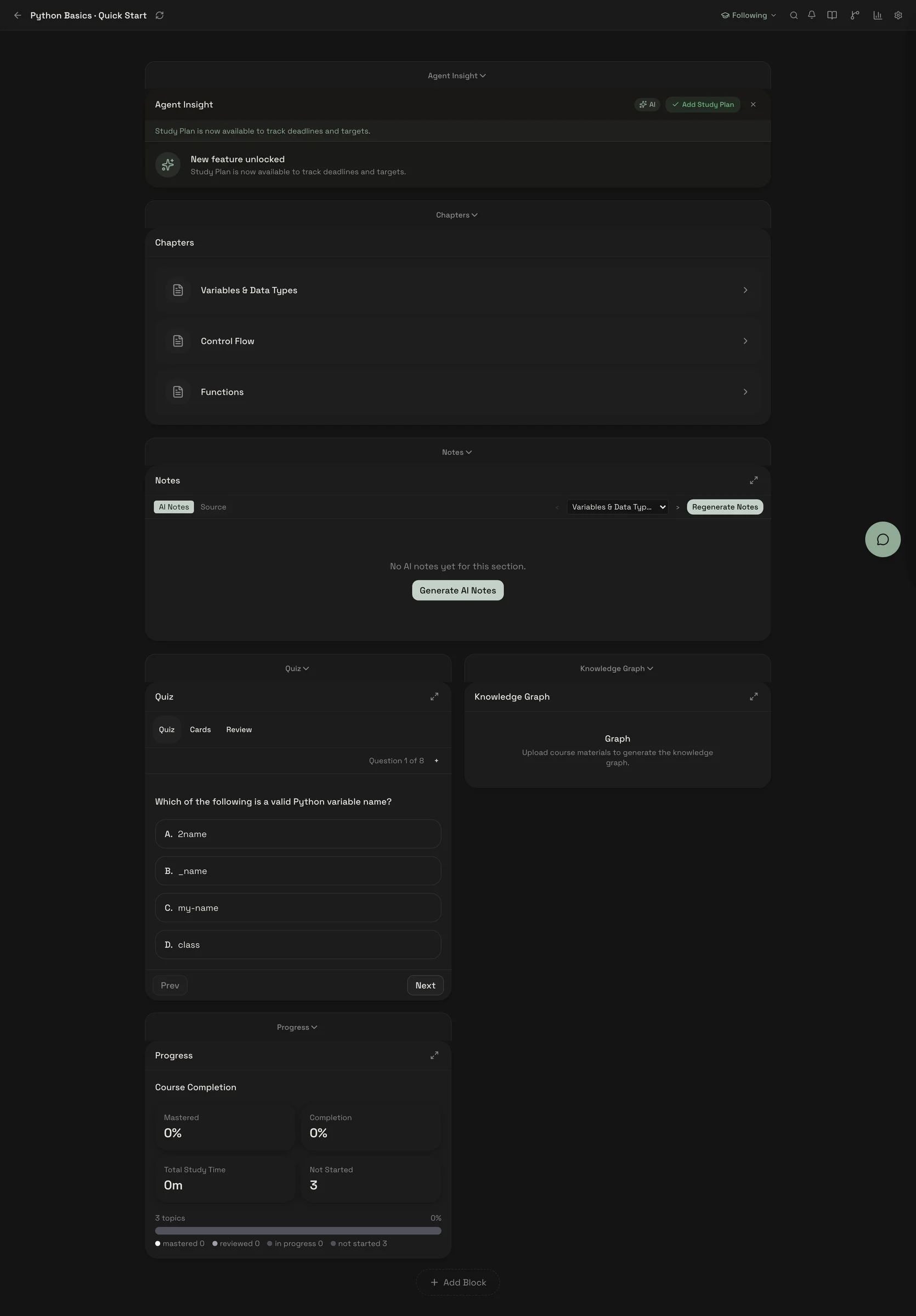
一个页面同时呈现章节、AI 笔记、测验、知识图谱与进度。
AI 用途:AI 将个人资料生成笔记、测验、闪卡,并按表现调整学习。
使用方式:默认接本机 Ollama,也支持 OpenAI、Anthropic、DeepSeek、Gemini、Groq、OpenRouter、vLLM、LM Studio 和自定义 OpenAI-compatible API。
原帖正文
OpenTutor
The first block-based adaptive learning workspace that runs locally.
Drop in a PDF. Get an AI tutor that actually adapts to how you learn.
English | 中文
<!-- TODO: Replace with demo GIF once recorded --> <!-- <p align="center"></p> --> <p align="center"></p>The Problem
Every AI learning tool we tried had the same issue: they treat every student the same way. Same explanations. Same pace. Same questions. And they all require sending your data to the cloud.
The Solution
OpenTutor is a self-hosted, local-first AI learning platform. Upload your course material, and within 30 seconds you get structured notes, flashcards, quizzes, and an AI tutor — all running on your machine, completely free.
What makes it different:
- Block-based workspace that reshapes itself based on how you learn
- Runs locally with open-source LLMs — no API keys required, no data leaves your machine
- Grounded in learning science — FSRS spaced repetition, knowledge graphs, cognitive load detection
Upload → AI Teaches → You Practice → AI Remembers → AI Reminds → Repeat
Quick Start
3 commands. That's it.
git clone https://github.com/zijinz456/OpenTutor.git && cd OpenTutor
cp .env.example .env
docker compose up -d --build
Open http://localhost:3001. Done.
No Docker? Use
bash scripts/quickstart.shinstead — it handles Python venv, npm install, DB setup, and starts both servers.
One-Click Cloud Deploy
<details> <summary><strong>Manual setup (without Docker)</strong></summary># Backend
cd apps/api
python3 -m venv .venv && source .venv/bin/activate
pip install -r requirements-core.txt
uvicorn main:app --reload --port 8000
# Frontend (separate terminal)
cd apps/web && npm install && npm run dev
Visit http://localhost:3001.
</details> <details> <summary><strong>Platform support</strong></summary>| Platform | Status | |---|---| | macOS (Apple Silicon / Intel) | Supported | | Linux (Ubuntu 22.04+) | Supported | | Windows | Community-supported |
Prerequisites: Python 3.11+, Node.js 20+, Docker (optional)
</details>Security Note: Auth is disabled by default for local single-user use. Set
AUTH_ENABLED=trueand configureJWT_SECRET_KEYbefore any network-accessible deployment. See SECURITY.md.
Public Beta Notes (Local Single-User)
This repository currently targets a local single-user public beta.
- Supported first-class platforms: macOS and Linux
- Windows is community-supported
- Multi-user SaaS/classroom mode is out of scope for this beta
Known limitations for this beta:
- Mobile layout is not fully optimized across all workspace views
- Some advanced autonomous and graph-driven flows are still experimental
- LLM quality/latency depends on your local runtime and hardware
Before opening an issue, check:
Minimal Demo Flow (2-3 minutes)
- Create/open a course
- Upload a PDF/DOCX/PPTX file
- Ask a grounded tutor question in chat
- Complete one quiz or flashcard review
- Check plan/review suggestions in workspace
- Export at least one artifact (session or review content)
Features
Block-Based Adaptive Workspace
12 composable learning blocks — notes, quiz, flashcards, knowledge graph, study plan, analytics, and more. The workspace adapts: AI suggests layout changes based on your behavior, and progressively unlocks advanced features as you engage.
<p align="center"></p>AI Tutor with Source Citations
Every answer is grounded in your material. The tutor adapts depth based on behavioral signals — fatigue detection, error patterns, message brevity. Supports Socratic questioning mode.
<p align="center"></p>30-Second Content Ingestion
Upload PDF, DOCX, PPTX, or connect Canvas LMS. Get structured notes, AI-generated flashcards, and quiz questions automatically. 7 question types: MCQ, short answer, fill-in-blank, true/false, matching, ordering, coding.
<p align="center"></p>Adaptive Quiz & Practice
AI-generated quizzes with 7 question types. Wrong-answer tracking with diagnostic feedback. Difficulty adapts based on your performance.
<p align="center"></p>Study Plan & Calendar
Plan your study schedule with calendar view, task tracking, and deadline management.
<p align="center"></p>Spaced Repetition (FSRS 4.5)
Optimized free spaced repetition scheduling for flashcards. Tracks what you're forgetting and proactively reminds you to review.
Knowledge Graph (LOOM) [Experimental]
Tracks concept mastery, prerequisite relationships, and weak areas. Based on LOOM. Extracts concepts from your material, builds a knowledge graph, and generates optimal learning paths.
Semantic Review (LECTOR) [Experimental]
Extends FSRS with knowledge-graph-aware review prioritization. Based on LECTOR. Clusters related concepts for co-review, prioritizes prerequisites before dependents.
10+ LLM Providers
Local-first with Ollama by default. Switch to OpenAI, Anthropic, DeepSeek, Gemini, Groq, vLLM, LM Studio, OpenRouter, or any OpenAI-compatible endpoint.
# Local (free, default)
LLM_PROVIDER=ollama
LLM_MODEL=llama3.2:3b

# Cloud (optional)
LLM_PROVIDER=deepseek
LLM_MODEL=deepseek-chat
DEEPSEEK_API_KEY=sk-...
See .env.example for the full list.
Architecture
OpenTutor/
├── apps/
│   ├── api/              # FastAPI backend
│   │   ├── services/
│   │   │   ├── agent/              # 3 specialist agents (Tutor, Planner, Layout)
│   │   │   ├── ingestion/          # Content processing pipeline
│   │   │   ├── llm/                # Multi-provider LLM router + circuit breaker
│   │   │   ├── search/             # Hybrid BM25 + vector RAG
│   │   │   ├── spaced_repetition/  # FSRS scheduler + flashcards
│   │   │   └── learning_science/   # BKT, difficulty selection, cognitive load
│   │   ├── routers/           # API route modules (composed + subrouters)
│   │   └── models/            # SQLAlchemy ORM models
│   └── web/              # Next.js 16 frontend
│       └── src/
│           ├── components/blocks/  # 12 composable learning blocks
│           ├── store/              # Zustand state stores
│           └── lib/block-system/   # Block registry, templates, feature unlock
├── tests/                # pytest + Playwright E2E
└── docs/                 # PRD, SPEC, architecture decisions
Agent System
3 specialist agents coordinated by an intent-routing orchestrator:
| Agent | Role | |-------|------| | Tutor | Teaches with adaptive depth, Socratic questioning, source citations | | Planner | Study plans, goal tracking, deadline management | | Layout | Workspace configuration based on activity context |
Tech Stack
| Layer | Technologies | |-------|-------------| | Frontend | Next.js 16, React 19, TypeScript, Tailwind CSS 4, Zustand, shadcn/ui | | Backend | FastAPI, Python 3.11+, Pydantic 2, SQLAlchemy 2 (async), Alembic | | Database | SQLite (local-first, current release channel) | | Learning Science | FSRS 4.5, BKT, LOOM, LECTOR, Cognitive Load Theory | | CI/CD | GitHub Actions, Docker Compose, Playwright |
Research
Open
来源与作者
- 原作者:Zijin Zhang (@zijinz456)
- 发布平台:GitHub
- 原帖:查看原帖
- 权利说明:VibeMySpace 仅作带来源的整理展示,内容与图片权利归原作者。
开源信息
已开源。